- 1. linux 上使用clash (无GUI版)
- 2. 针对问题:clash_for_windows 修改clash配置文件后,如果更新订阅,修改会被覆盖。
- 3. clash verge rev 的 global extend script
1. linux 上使用clash (无GUI版)
以ubuntu为例子
1.1. 安装clash
wget https://pub-eac3eb5670f44f09984dee5c57939316.r2.dev/clash-linux-amd64-v1.18.0.gz
gunzip clash-linux-amd64-v1.18.0.gz
chmod 777 clash-linux-amd64-v1.18.0
1.2. 准备clash订阅文件
一般订阅vpn后都会给一个配置文件, 开头可能类似于下图的样子
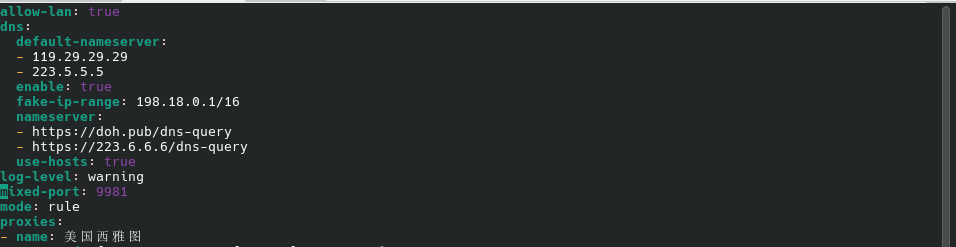
可选地,修改clash配置文件的端口mixed-port
1.3. 启动clash
./clash-linux-amd64-v1.18.0 -f clash_config.yaml启动后应该类似于下面这样

1.4. 使用梯子
1.4.1. 设置环境变量
注意端口要与clash配置文件里的端口一致。
-
对于fish
set -g proxy_port 17890 set -g proxy_ip 127.0.0.1 function proxy_on for var in http_proxy https_proxy all_proxy HTTP_PROXY HTTPS_PROXY ALL_PROXY set -l cmd "set -gx $var http://$proxy_ip:$proxy_port" echo $cmd eval $cmd end set -gx no_proxy 127.0.0.1,localhost set -gx NO_PROXY 127.0.0.1,localhost echo -e "\033[32m[√] Proxy enabled\033[0m" end function proxy_off for var in http_proxy https_proxy all_proxy HTTP_PROXY HTTPS_PROXY ALL_PROXY NO_PROXY no_proxy set -l cmd "set -e $var" echo $cmd eval $cmd end echo -e "\033[31m[×] Proxy disabled\033[0m" end proxy_on -
对于bash
proxy_ip="127.0.0.1"
proxy_port="17890"
proxy_on() {
    export http_proxy="http://$proxy_ip:$proxy_port"
    export https_proxy="http://$proxy_ip:$proxy_port"
    export all_proxy="http://$proxy_ip:$proxy_port"
    export HTTP_PROXY="$http_proxy"
    export HTTPS_PROXY="$https_proxy"
    export ALL_PROXY="$all_proxy"
    export no_proxy="127.0.0.1,localhost"
    export NO_PROXY="$no_proxy"
    echo -e "\033[32m[√] Proxy enabled\033[0m"
}

proxy_off() {
    unset http_proxy https_proxy all_proxy HTTP_PROXY HTTPS_PROXY ALL_PROXY no_proxy NO_PROXY
    echo -e "\033[31m[×] Proxy disabled\033[0m"
}
proxy_on
1.4.2. 测试并验证
yang@yang-Z690-AORUS-ELITE ~/w/z/proj> wget baidu.com
Will not apply HSTS. The HSTS database must be a regular and non-world-writable file.
ERROR: could not open HSTS store at '/home/yang/.wget-hsts'. HSTS will be disabled.
--2026-01-21 23:17:15--  http://baidu.com/
正在解析主机 baidu.com (baidu.com)... 124.237.177.164, 110.242.74.102, 111.63.65.247, ...
正在连接 baidu.com (baidu.com)|124.237.177.164|:80... 已连接。
已发出 HTTP 请求,正在等待回应... 301 Moved Permanently
位置:http://www.baidu.com/ [跟随至新的 URL]
--2026-01-21 23:17:15--  http://www.baidu.com/
正在解析主机 www.baidu.com (www.baidu.com)... 2408:871a:2100:1b23:0:ff:b07a:7ebc, 2408:871a:2100:186c:0:ff:b07e:3fbc, 110.242.69.21, ...
正在连接 www.baidu.com (www.baidu.com)|2408:871a:2100:1b23:0:ff:b07a:7ebc|:80... 已连接。
已发出 HTTP 请求,正在等待回应... 200 OK
长度: 未指定 [text/html]
正在保存至: “index.html”

index.html                       [ <=>                                           ] 306.49K  --.-KB/s    用时 0.07s

2026-01-21 23:17:15 (4.09 MB/s) - “index.html” 已保存 [313850]

yang@yang-Z690-AORUS-ELITE ~/w/z/proj> proxy_on
set -gx http_proxy http://127.0.0.1:17890
set -gx https_proxy http://127.0.0.1:17890
set -gx all_proxy http://127.0.0.1:17890
set -gx HTTP_PROXY http://127.0.0.1:17890
set -gx HTTPS_PROXY http://127.0.0.1:17890
set -gx ALL_PROXY http://127.0.0.1:17890
[√] Proxy enabled
yang@yang-Z690-AORUS-ELITE ~/w/z/proj> wget baidu.com
Will not apply HSTS. The HSTS database must be a regular and non-world-writable file.
ERROR: could not open HSTS store at '/home/yang/.wget-hsts'. HSTS will be disabled.
--2026-01-21 23:17:48--  http://baidu.com/
正在连接 127.0.0.1:17890... 已连接。
已发出 Proxy 请求,正在等待回应... 301 Moved Permanently
位置:http://www.baidu.com/ [跟随至新的 URL]
--2026-01-21 23:17:48--  http://www.baidu.com/
再次使用存在的到 127.0.0.1:17890 的连接。
已发出 Proxy 请求,正在等待回应... 200 OK
长度: 2381 (2.3K) [text/html]
正在保存至: “index.html.1”

index.html.1                 100%[==============================================>]   2.33K  --.-KB/s    用时 0s

2026-01-21 23:17:48 (20.6 MB/s) - 已保存 “index.html.1” [2381/2381])

yang@yang-Z690-AORUS-ELITE ~/w/z/proj>
2. 针对问题:clash_for_windows 修改clash配置文件后,如果更新订阅,修改会被覆盖。
[在General面板]开启Mixin选项,
[在Settings面板]指定Minin类型为javascript,
然后添加js代码。操作content对象即可修改配置文件。
module.exports.parse = ({ content, name, url }, { yaml, axios, notify }) => {
  content.rules.unshift(
    "PROCESS-NAME,chrome,DIRECT",
    "PROCESS-NAME,qqmusic,DIRECT",
    "PROCESS-NAME,rustdesk,DIRECT",
    "PROCESS-NAME,ssh,DIRECT",
    "PROCESS-NAME,ToDesk,DIRECT",
    "PROCESS-NAME,ting_en,DIRECT",
    "PROCESS-NAME,zhihu.com,DIRECT",
    "PROCESS-NAME,msedge,DIRECT",
    "DOMAIN-KEYWORD,www.kimi.com,DIRECT",
    "DOMAIN-KEYWORD,nenu.edu.cn,DIRECT",
  )
  return content
}详细的过滤规则见这里
3. clash verge rev 的 global extend script
// Define main function (script entry)

function main(config) {
  if (!config.rules) {
    config.rules = []
  }

  const directRules = [
    // mac
    "PROCESS-NAME,Google Chrome,DIRECT",
    "PROCESS-NAME,Google Chrome Helper,DIRECT",
    "PROCESS-NAME,Google Chrome Helper (Renderer),DIRECT",
    "PROCESS-NAME,QQMusic,DIRECT",
    "PROCESS-NAME,QQ,DIRECT",
    "PROCESS-NAME,WeChat,DIRECT",
    "PROCESS-NAME,ssh,DIRECT",
    // "PROCESS-NAME,Firefox,DIRECT",

    // linux
    "PROCESS-NAME,chrome,DIRECT",
    "PROCESS-NAME,qqmusic,DIRECT",
    "PROCESS-NAME,rustdesk,DIRECT",
    "PROCESS-NAME,ssh,DIRECT",
    "PROCESS-NAME,ToDesk,DIRECT",
    "PROCESS-NAME,ting_en,DIRECT",

    // domain
    "DOMAIN-KEYWORD,kimi.com,DIRECT",
    "DOMAIN-KEYWORD,nenu.edu.cn,DIRECT",
  ]

  config.rules.unshift(...directRules)

  return config
}